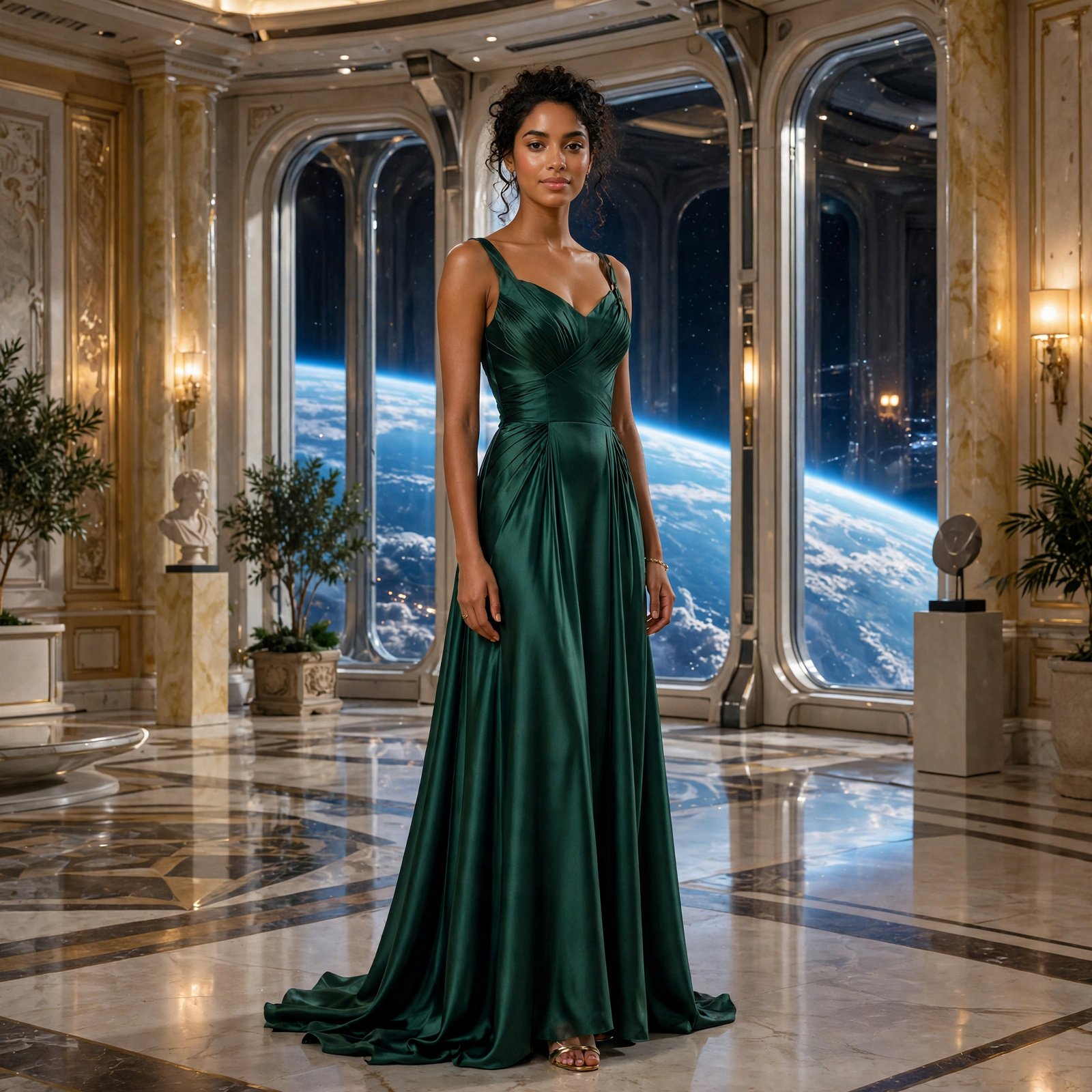
I started experimenting with AI vertical drama after hearing an AI author and publisher describe the format as a large, still-emerging opportunity for writers.
The commercial potential was interesting, but that wasn’t really what hooked me.
I’m a very visual storyteller. Stories tend to arrive in my head as images, scenes and character moments, and then I have to translate all of that into words on a page.
AI video suggested a slightly intoxicating possibility: what if I could skip some of that translation and just make the visual story?
I also already enjoyed watching traditional vertical dramas and short-form skit creators, particularly when they managed to tell surprisingly satisfying stories in tiny pieces. The short format made the experiment feel achievable. I didn’t have to commit to making a movie. I could make one scene. Then another. Maybe eventually an episode.
So I decided to find out what was actually possible.
My expectations were slightly optimistic
I had been working with AI-generated images for more than two years by this point.
Modern image generators had become so good that the old jokes about six fingers and mysterious extra limbs were mostly obsolete in my normal workflow.
I assumed video had progressed further than it actually had.
Part of that impression came from watching demonstrations of tools such as Pippit, where creating short AI-video scenes looked remarkably straightforward.
To be fair, I only tested Pippit on its free tier, so the paid experience may well be smoother.
But once I started trying to create an actual sequence rather than a single impressive clip, I discovered that AI video still contained rather a lot of classic AI weirdness.
Extra legs were back.
Objects teleported.
Clothing changed its mind halfway through a shot.
Apparently motion gives artificial intelligence many more opportunities to become creative in ways nobody asked for.
Choosing somewhere I could afford to fail
I briefly experimented with several tools, including Pippit and Hedra, but I knew I needed somewhere I could generate over and over again while I figured out what I was doing.
I already had a substantial allocation of credits in Google Flow, so that became my main testing ground.
This turned out to be important.
AI video is still expensive enough that experimenting properly can become uncomfortable very quickly. If every failed attempt feels financially painful, you become reluctant to test anything interesting.
I needed somewhere I could make mistakes.
There would be quite a few.
The first experiment: Nessa and Lucan
I deliberately chose a scene that was simple, but not too simple.
Nessa arrives in a room on an orbital palace.
She is surprised to find Lucan there.
They talk.
They move to another location.
They talk some more.
No battles. No spaceships exploding. No elaborate choreography.
My first shot was simply Nessa entering the room.
The room itself was gorgeous: a futuristic palace interior with an enormous window overlooking a planet.
Unfortunately, “woman enters room” turned out to be considerably more ambitious than it sounded.
Initially I wanted her to push the door open with her boot while holding a pen in her mouth.
The model responded with extra legs, unstable clothing and a pen that somehow teleported from her mouth into her hand.
Fine.
I removed the pen.
Then I stopped asking her to push the door open with her boot.
Then I reduced the instruction to essentially: walk through the doorway.
Eventually I gave up on the doorway altogether.
The finished version simply opens with Nessa already standing inside the room.
This became one of the first useful lessons of the experiment:
sometimes the best way to fix a difficult AI-video shot is not to generate it.
If the story doesn’t genuinely need to see somebody walk through a door, maybe they can simply already be in the room.
Cinema has survived worse compromises.
Eight seconds is a surprisingly strange amount of time
The Google video model I was using produced fixed eight-second clips.
There was no option for five seconds because that was all I needed, or twelve because the scene needed more space.
Everything was eight.
That meant I had to learn a completely new kind of pacing.
Some actions weren’t substantial enough to justify eight seconds, leaving a lot of generated footage I would never use.
Other actions were far too complex to complete convincingly within the same window.
There was a sweet spot somewhere between “person looks to the left” and “person enters a room, crosses it, reacts to another character and begins a conversation.”
Finding that sweet spot became part of the directing process.
Starting images changed everything
One of the biggest improvements came when I stopped asking the video model to invent the entire shot from scratch.
I started creating controlled starting images first.
ChatGPT worked particularly well for this because image generation was conversational and character consistency was strong. I could establish the character, location, framing and general composition before handing the image to the video model.
That reduced the number of things the video generator had to invent simultaneously.
Instead of:
Please invent this character, this room, this costume, this camera angle and this performance.
the problem became much closer to:
Here is the shot. Make this person move.
That proved considerably more manageable.
Then I made the mistake of putting two people in one shot
It can absolutely be done.
I simply decided quite quickly that I did not want to spend my credits proving it.
Two-character shots introduced more opportunities for identity drift, strange interactions, inconsistent movement and regeneration.
For ordinary dialogue, it felt like unnecessary friction.
So I separated the characters.
Nessa got her shot.
Lucan got his.
Then I edited them together in Clipchamp.
And suddenly it looked like a conversation.
This became one of the most useful discoveries of the experiment.
Eyelines are doing more work than you think
I learned that if one character looks slightly screen left and the other looks slightly screen right, cutting between them is often enough to convince the viewer that they are looking at each other.
Their backgrounds do not even need to match perfectly.
Nessa might have the enormous palace window behind her.
Lucan might have a corridor wall.
That’s fine.
The viewer naturally interprets those as opposite sides of the same room.
This was fortunate because the orbital-palace setting I had chosen for my very first experiment turned out to be spectacularly inconvenient for visual consistency.
In hindsight, perhaps I should not have begun my “keep the background consistent” experiment with an enormous futuristic window overlooking another planet.
Still, it worked.
Eventually.
Then I started thinking about credits
At first, I generated one line of dialogue per character per clip.
That was simple, but wasteful.
Each eight-second generation cost 15 Flow credits, and I started with around 1,000.
It didn’t take long to realise that I was going to burn through them astonishingly quickly.
So I changed the way I generated the dialogue.
Instead of one usable line inside an eight-second clip, I started trying to get two.
Then I could split the clip in Clipchamp.
Nessa line one.
Cut to Lucan.
Back to Nessa line two.
Do the same thing with Lucan’s clip.
For straightforward dialogue scenes, I could effectively get twice as much usable conversation from the same generation.
At that point the experiment had stopped being purely about “can AI make this?”
how do I design the production process around the economics of the tool?
Talking images were much more useful than I expected
Pippit introduced me to another important idea: not every dialogue shot needs full video generation.
If a character is standing in roughly one place and talking, a talking-image model may be enough.
And “talking image” turned out to cover a surprisingly wide range of behaviour.
Some tools essentially animate the mouth and face.
Others produce much more substantial performance.
I tested talking-image generation in Pippit, Hedra and HeyGen and saw characters move, react and in some cases dramatically turn toward the camera as they delivered a line.
That meant I could start thinking in terms of different tools for different kinds of shots.
Use full video generation where the scene actually needs movement.
Use a simpler performance-generation method for dialogue.
Save the expensive tools for the difficult parts.
The most impressive tool was also the least practical
Seedance produced some of the strongest video results I tested.
I loved it.
I also realised very quickly that it was completely impractical for the amount of experimentation I wanted to do.
A basic credit pack effectively gave me one useful shot for this project.
One.
It was the classic AI-tool problem: the output suggested a future where much of the current editing and friction could disappear, but the current economics made it difficult to use that future very often.
I would happily have kept playing with it.
My wallet had other ideas.
Better models weren’t simply “better”
Another interesting discovery happened inside Google Flow itself.
Different available video models were good at different things.
Some were stronger for cinematic movement and visual spectacle.
Others were much better at facial expression, line delivery and character performance.
That meant I stopped thinking in terms of one “best” model.
The useful question became:
best for what?
For a visually complicated shot, I might choose one model.
For an emotionally intense exchange, another.
That kind of model routing became more useful than simply choosing the most expensive option and assuming it would win at everything.
Voice acting became its own experiment
Google Flow allowed me to create characters and assign voices, which was useful.
But some of the talking-image tools required an uploaded audio file rather than generating the voice themselves, so I started experimenting with ElevenLabs.
What I wanted was fairly specific:
- a stable voice for each character
- control over accent and vocal quality
- better emotional delivery
- control over pauses
- the ability to make a line sound defensive, threatening, uncertain, or intimate without regenerating endlessly
The results were mixed. The voices themselves could be very good, but the workflow was not necessarily better.
Separating the audio from the video introduced another stage: generate voice, listen, adjust prompt, regenerate, export, upload somewhere else, animate the image, then edit the result.
More modularity did not automatically mean more control. In some cases it simply meant more steps.
I also discovered that what I really wanted was conversational direction. I didn’t want to rewrite a prompt every time.
I wanted to say:
That pause isn’t long enough.
or:
He sounds annoyed. I want him to sound dangerous.
and continue from there.
Flow gave me more of that conversational iteration, and once I was using the right model for the scene, the built-in performance was generally good enough for what I needed.
So despite experimenting with a more specialised voice pipeline, I ended up preferring the simpler integrated workflow.
Also: please stop adding dramatic music
Some video generations helpfully added background music or sound effects.
This sounds useful until you try to edit the scene.
If the music is baked into one character’s dialogue clip, cutting between characters suddenly becomes much harder without obvious audio discontinuities.
My rule became very simple:
No music. Limited sound effects.
Generate the performance clean.
Add everything else later in the editor.
This was another small decision that made the entire workflow less painful.
The workflow I eventually settled into
By the end of the experiment, my approach looked very different from the one I had imagined at the beginning.
I simplified actions aggressively.
Unless the viewer genuinely needed to see someone kick open a door, they could already be standing on the other side of it.
I generally generated one character at a time for dialogue.
I used starting images wherever possible.
I chose different generation methods depending on whether I needed cinematic movement, expressive performance, or simple speech.
I reserved expensive generation for shots that actually justified it.
And one continuity trick became particularly useful: taking an image from the end of one generated clip and using that as the starting point for the next.
That helped preserve body language, framing, and visual state between clips and made sequences feel much more continuous.
The overall lesson was not that one particular model or platform had solved AI filmmaking.
It was almost the opposite.
The most effective workflow came from combining several kinds of generation and letting each one do only the job it was good at.
The economics were harder to ignore
The Nessa and Lucan test sequence was only around 80 seconds long.
It consumed roughly my entire 1,000-credit Flow allocation.
This was my first serious attempt, and I spent a lot of credits learning what not to do. Using the workflow I developed later, I could almost certainly make the same amount of usable footage much more efficiently.
Still, it changed my view of the opportunity.
Could I use AI to turn an entire novel into a vertical drama?
Probably.
Do I currently want to?
Not enough to spend the required time and money discovering exactly how dedicated I am.
Where I landed
I started this experiment wondering whether AI video had reached the point where a solo author could reasonably turn stories into vertical drama.
My answer is:
Technically, much more than I expected. Practically, less than I hoped.
The tools are capable enough to create genuinely compelling short scenes.
They are not yet frictionless.
Good results still depend heavily on shot design, editing, continuity management, model selection, and knowing when not to ask the generator to do something.
And video generation remains expensive enough that the scale of the project matters.
For me, the most compelling use cases are no longer “adapt an entire novel.”
They are:
- favourite scenes
- character moments
- concept trailers
- promotional clips
- ads
- proof-of-concept sequences
- visual experiments I simply want to see exist
That feels much more achievable.
And creatively, I still love the underlying idea.
I spend a lot of my life translating images in my head into words on a page.
AI video gives me another option.
Sometimes, instead of describing the scene, I can just make it.